## Web前端概述
> **说明**:本文使用的部分插图来自*Jon Duckett*先生的*[HTML and CSS: Design and Build Websites](https://www.amazon.cn/dp/1118008189/ref=sr_1_5?__mk_zh_CN=%E4%BA%9A%E9%A9%AC%E9%80%8A%E7%BD%91%E7%AB%99&keywords=html+%26+css&qid=1554609325&s=gateway&sr=8-5)*一书,这是一本非常棒的前端入门书,有兴趣的读者可以在亚马逊或者其他网站上找到该书的购买链接。
HTML 是用来描述网页的一种语言,全称是 Hyper-Text Markup Language,即超文本标记语言。我们浏览网页时看到的文字、按钮、图片、视频等元素,它们都是通过 HTML 书写并通过浏览器来呈现的。
### HTML简史
1. 1991年10月:一个非正式CERN([欧洲核子研究中心](https://zh.wikipedia.org/wiki/%E6%AD%90%E6%B4%B2%E6%A0%B8%E5%AD%90%E7%A0%94%E7%A9%B6%E7%B5%84%E7%B9%94))文件首次公开18个HTML标签,这个文件的作者是物理学家[蒂姆·伯纳斯-李](https://zh.wikipedia.org/wiki/%E8%92%82%E5%A7%86%C2%B7%E4%BC%AF%E7%BA%B3%E6%96%AF-%E6%9D%8E),因此他是[万维网](https://zh.wikipedia.org/wiki/%E4%B8%87%E7%BB%B4%E7%BD%91)的发明者,也是[万维网联盟](https://zh.wikipedia.org/wiki/%E4%B8%87%E7%BB%B4%E7%BD%91%E8%81%94%E7%9B%9F)的主席。
2. 1995年11月:HTML 2.0标准发布(RFC 1866)。
3. 1997年1月:HTML 3.2作为[W3C](https://zh.wikipedia.org/wiki/W3C)推荐标准发布。
4. 1997年12月:HTML 4.0作为W3C推荐标准发布。
5. 1999年12月:HTML4.01作为W3C推荐标准发布。
6. 2008年1月:HTML5由W3C作为工作草案发布。
7. 2011年5月:W3C将HTML5推进至“最终征求”(Last Call)阶段。
8. 2012年12月:W3C指定HTML5作为“候选推荐”阶段。
9. 2014年10月:HTML5作为稳定W3C推荐标准发布,这意味着HTML5的标准化已经完成。
#### HTML5新特性
1. 引入原生多媒体支持(audio和video标签)
2. 引入可编程内容(canvas标签)
3. 引入语义Web(article、aside、details、figure、footer、header、nav、section、summary等标签)
4. 引入新的表单控件(日历、邮箱、搜索、滑条等)
5. 引入对离线存储更好的支持(localStorage和sessionStorage)
6. 引入对定位、拖放、WebSocket、后台任务等的支持
### 使用标签承载内容
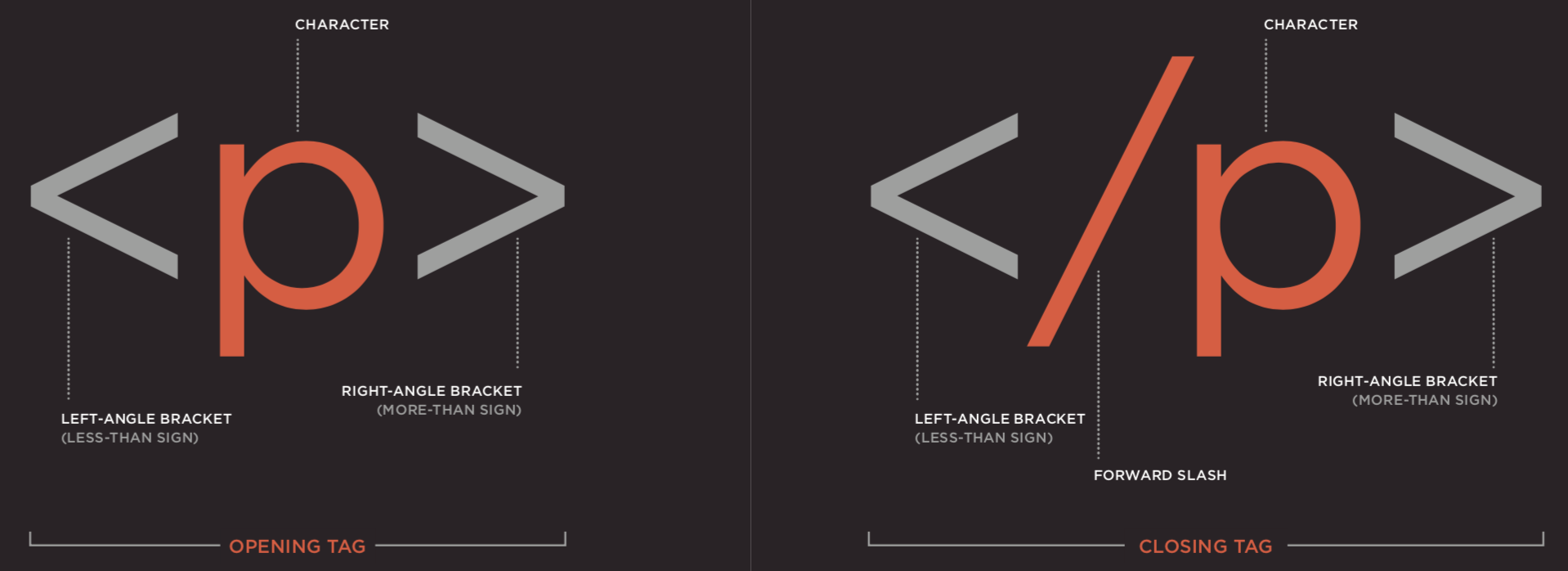
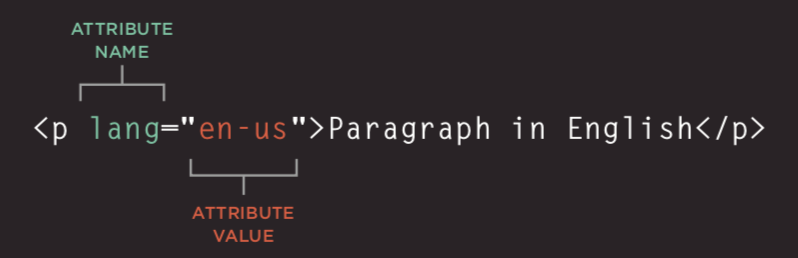 #### 结构
- html
- head
- title
- meta
- body
#### 文本
- 标题(heading)和段落(paragraph)
- h1 ~ h6
- p
- 上标(superscript)和下标(subscript)
- sup
- sub
- 空白(白色空间折叠)
- 折行(break)和水平标尺(horizontal ruler)
- br
- hr
- 语义化标签
- 加粗和强调 - strong
- 引用 - blockquote
- 缩写词和首字母缩写词 - abbr / acronym
- 引文 - cite
- 所有者联系信息 - address
- 内容的修改 - ins / del
#### 列表(list)
- 有序列表(ordered list)- ol / li
- 无序列表(unordered list)- ul / li
- 定义列表(definition list)- dl / dt / dd
#### 链接(anchor)
- 页面链接
- 锚链接
- 功能链接
#### 图像(image)
- 图像存储位置

- 图像及其宽高
- 选择正确的图像格式
- JPEG
- GIF
- PNG
- 矢量图
- 语义化标签 - figure / figcaption
#### 表格(table)
- 基本的表格结构 - table / tr / td / th
- 表格的标题 - caption
- 跨行和跨列 - rowspan属性 / colspan属性
- 长表格 - thead / tbody / tfoot
#### 表单(form)
- 重要属性 - action / method / enctype
- 表单控件(input)- type属性
- 文本框 - `text` / 密码框 - `password` / 数字框 - `number`
- 邮箱 - `email` / 电话 - `tel` / 日期 - `date` / 滑条 - `range` / URL - `url` / 搜索 - `search`
- 单选按钮 - `radio` / 复选按钮 - `checkbox`
- 文件上传 - `file` / 隐藏域 - `hidden`
- 提交按钮 - `submit` / 图像按钮 - `image` / 重置按钮 - `reset`
- 下拉列表 - select / option
- 文本域(多行文本)- textarea
- 组合表单元素 - fieldset / legend
#### 音视频(audio / video)
- 视频格式和播放器
- 视频托管服务
- 添加视频的准备工作
- video标签和属性 - autoplay / controls / loop / muted / preload / src
- audio标签和属性 - autoplay / controls / loop / muted / preload / src / width / height / poster
#### 窗口(frame)
- 框架集(过时,不建议使用) - frameset / frame
- 内嵌窗口 - iframe
#### 其他
- 文档类型
```HTML
```
```HTML
```
```HTML
```
- 注释
```HTML
```
- 属性
- id:唯一标识
- class:元素所属的类,用于区分不同的元素
- title:元素的额外信息(鼠标悬浮时会显示工具提示文本)
- tabindex:Tab键切换顺序
- contenteditable:元素是否可编辑
- draggable:元素是否可拖拽
- 块级元素 / 行级元素
- 字符实体(实体替换符)

### 使用CSS渲染页面
#### 简介
- CSS的作用
- CSS的工作原理
- 规则、属性和值

- 常用选择器

#### 颜色(color)
- 如何指定颜色
- 颜色术语和颜色对比
- 背景色
#### 文本(text / font)
- 文本的大小和字型(font-size / font-family)


- 粗细、样式、拉伸和装饰(font-weight / font-style / font-stretch / text-decoration)

- 行间距(line-height)、字母间距(letter-spacing)和单词间距(word-spacing)
- 对齐(text-align)方式和缩进(text-ident)
- 链接样式(:link / :visited / :active / :hover)
- CSS3新属性
- 阴影效果 - text-shadow
- 首字母和首行文本(:first-letter / :first-line)
- 响应用户
#### 盒子(box model)
- 盒子大小的控制(width / height)

- 盒子的边框、外边距和内边距(border / margin / padding)

- 盒子的显示和隐藏(display / visibility)
- CSS3新属性
- 边框图像(border-image)
- 投影(border-shadow)
- 圆角(border-radius)
#### 列表、表格和表单
- 列表的项目符号(list-style)
- 表格的边框和背景(border-collapse)
- 表单控件的外观
- 表单控件的对齐
- 浏览器的开发者工具
#### 图像
- 控制图像的大小(display: inline-block)
- 对齐图像
- 背景图像(background / background-image / background-repeat / background-position)
#### 布局
- 控制元素的位置(position / z-index)
- 普通流
- 相对定位
- 绝对定位
- 固定定位
- 浮动元素(float / clear)
- 网站布局
- HTML5布局

- 适配屏幕尺寸
- 固定宽度布局
- 流体布局
- 布局网格
### 使用JavaScript控制行为
#### JavaScript基本语法
- 语句和注释
- 变量和数据类型
- 声明和赋值
- 简单数据类型和复杂数据类型
- 变量的命名规则
- 表达式和运算符
- 赋值运算符
- 算术运算符
- 比较运算符
- 逻辑运算符:`&&`、`||`、`!`
- 分支结构
- `if...else...`
- `switch...cas...default...`
- 循环结构
- `for`循环
- `while`循环
- `do...while`循环
- 数组
- 创建数组
- 操作数组中的元素
- 函数
- 声明函数
- 调用函数
- 参数和返回值
- 匿名函数
- 立即调用函数
#### 面向对象
- 对象的概念
- 创建对象的字面量语法
- 访问成员运算符
- 创建对象的构造函数语法
- `this`关键字
- 添加和删除属性
- `delete`关键字
- 标准对象
- `Number` / `String` / `Boolean` / `Symbol` / `Array` / `Function`
- `Date` / `Error` / `Math` / `RegExp` / `Object` / `Map` / `Set`
- `JSON` / `Promise` / `Generator` / `Reflect` / `Proxy`
#### BOM
- `window`对象的属性和方法
- `history`对象
- `forward()` / `back()` / `go()`
- `location`对象
- `navigator`对象
- `screen`对象
#### DOM
- DOM树
- 访问元素
- `getElementById()` / `querySelector()`
- `getElementsByClassName()` / `getElementsByTagName()` / `querySelectorAll()`
- `parentNode` / `previousSibling` / `nextSibling` / `children` / `firstChild` / `lastChild`
- 操作元素
- `nodeValue`
- `innerHTML` / `textContent` / `createElement()` / `createTextNode()` / `appendChild()` / `insertBefore()` / `removeChild()`
- `className` / `id` / `hasAttribute()` / `getAttribute()` / `setAttribute()` / `removeAttribute()`
- 事件处理
- 事件类型
- UI事件:`load` / `unload` / `error` / `resize` / `scroll`
- 键盘事件:`keydown` / `keyup` / `keypress`
- 鼠标事件:`click` / `dbclick` / `mousedown` / `mouseup` / `mousemove` / `mouseover` / `mouseout`
- 焦点事件:`focus` / `blur`
- 表单事件:`input` / `change` / `submit` / `reset` / `cut` / `copy` / `paste` / `select`
- 事件绑定
- HTML事件处理程序(不推荐使用,因为要做到标签与代码分离)
- 传统的DOM事件处理程序(只能附加一个回调函数)
- 事件监听器(旧的浏览器中不被支持)
- 事件流:事件捕获 / 事件冒泡
- 事件对象(低版本IE中的window.event)
- `target`(有些浏览器使用srcElement)
- `type`
- `cancelable`
- `preventDefault()`
- `stopPropagation()`(低版本IE中的cancelBubble)
- 鼠标事件 - 事件发生的位置
- 屏幕位置:`screenX`和`screenY`
- 页面位置:`pageX`和`pageY`
- 客户端位置:`clientX`和`clientY`
- 键盘事件 - 哪个键被按下了
- `keyCode`属性(有些浏览器使用`which`)
- `String.fromCharCode(event.keyCode)`
- HTML5事件
- `DOMContentLoaded`
- `hashchange`
- `beforeunload`
#### JavaScript API
- 客户端存储 - `localStorage`和`sessionStorage`
```JavaScript
localStorage.colorSetting = '#a4509b';
localStorage['colorSetting'] = '#a4509b';
localStorage.setItem('colorSetting', '#a4509b');
```
- 获取位置信息 - `geolocation`
```JavaScript
navigator.geolocation.getCurrentPosition(function(pos) {
console.log(pos.coords.latitude)
console.log(pos.coords.longitude)
})
```
- 从服务器获取数据 - Fetch API
- 绘制图形 - `
#### 结构
- html
- head
- title
- meta
- body
#### 文本
- 标题(heading)和段落(paragraph)
- h1 ~ h6
- p
- 上标(superscript)和下标(subscript)
- sup
- sub
- 空白(白色空间折叠)
- 折行(break)和水平标尺(horizontal ruler)
- br
- hr
- 语义化标签
- 加粗和强调 - strong
- 引用 - blockquote
- 缩写词和首字母缩写词 - abbr / acronym
- 引文 - cite
- 所有者联系信息 - address
- 内容的修改 - ins / del
#### 列表(list)
- 有序列表(ordered list)- ol / li
- 无序列表(unordered list)- ul / li
- 定义列表(definition list)- dl / dt / dd
#### 链接(anchor)
- 页面链接
- 锚链接
- 功能链接
#### 图像(image)
- 图像存储位置

- 图像及其宽高
- 选择正确的图像格式
- JPEG
- GIF
- PNG
- 矢量图
- 语义化标签 - figure / figcaption
#### 表格(table)
- 基本的表格结构 - table / tr / td / th
- 表格的标题 - caption
- 跨行和跨列 - rowspan属性 / colspan属性
- 长表格 - thead / tbody / tfoot
#### 表单(form)
- 重要属性 - action / method / enctype
- 表单控件(input)- type属性
- 文本框 - `text` / 密码框 - `password` / 数字框 - `number`
- 邮箱 - `email` / 电话 - `tel` / 日期 - `date` / 滑条 - `range` / URL - `url` / 搜索 - `search`
- 单选按钮 - `radio` / 复选按钮 - `checkbox`
- 文件上传 - `file` / 隐藏域 - `hidden`
- 提交按钮 - `submit` / 图像按钮 - `image` / 重置按钮 - `reset`
- 下拉列表 - select / option
- 文本域(多行文本)- textarea
- 组合表单元素 - fieldset / legend
#### 音视频(audio / video)
- 视频格式和播放器
- 视频托管服务
- 添加视频的准备工作
- video标签和属性 - autoplay / controls / loop / muted / preload / src
- audio标签和属性 - autoplay / controls / loop / muted / preload / src / width / height / poster
#### 窗口(frame)
- 框架集(过时,不建议使用) - frameset / frame
- 内嵌窗口 - iframe
#### 其他
- 文档类型
```HTML
```
```HTML
```
```HTML
```
- 注释
```HTML
```
- 属性
- id:唯一标识
- class:元素所属的类,用于区分不同的元素
- title:元素的额外信息(鼠标悬浮时会显示工具提示文本)
- tabindex:Tab键切换顺序
- contenteditable:元素是否可编辑
- draggable:元素是否可拖拽
- 块级元素 / 行级元素
- 字符实体(实体替换符)

### 使用CSS渲染页面
#### 简介
- CSS的作用
- CSS的工作原理
- 规则、属性和值

- 常用选择器

#### 颜色(color)
- 如何指定颜色
- 颜色术语和颜色对比
- 背景色
#### 文本(text / font)
- 文本的大小和字型(font-size / font-family)


- 粗细、样式、拉伸和装饰(font-weight / font-style / font-stretch / text-decoration)

- 行间距(line-height)、字母间距(letter-spacing)和单词间距(word-spacing)
- 对齐(text-align)方式和缩进(text-ident)
- 链接样式(:link / :visited / :active / :hover)
- CSS3新属性
- 阴影效果 - text-shadow
- 首字母和首行文本(:first-letter / :first-line)
- 响应用户
#### 盒子(box model)
- 盒子大小的控制(width / height)

- 盒子的边框、外边距和内边距(border / margin / padding)

- 盒子的显示和隐藏(display / visibility)
- CSS3新属性
- 边框图像(border-image)
- 投影(border-shadow)
- 圆角(border-radius)
#### 列表、表格和表单
- 列表的项目符号(list-style)
- 表格的边框和背景(border-collapse)
- 表单控件的外观
- 表单控件的对齐
- 浏览器的开发者工具
#### 图像
- 控制图像的大小(display: inline-block)
- 对齐图像
- 背景图像(background / background-image / background-repeat / background-position)
#### 布局
- 控制元素的位置(position / z-index)
- 普通流
- 相对定位
- 绝对定位
- 固定定位
- 浮动元素(float / clear)
- 网站布局
- HTML5布局

- 适配屏幕尺寸
- 固定宽度布局
- 流体布局
- 布局网格
### 使用JavaScript控制行为
#### JavaScript基本语法
- 语句和注释
- 变量和数据类型
- 声明和赋值
- 简单数据类型和复杂数据类型
- 变量的命名规则
- 表达式和运算符
- 赋值运算符
- 算术运算符
- 比较运算符
- 逻辑运算符:`&&`、`||`、`!`
- 分支结构
- `if...else...`
- `switch...cas...default...`
- 循环结构
- `for`循环
- `while`循环
- `do...while`循环
- 数组
- 创建数组
- 操作数组中的元素
- 函数
- 声明函数
- 调用函数
- 参数和返回值
- 匿名函数
- 立即调用函数
#### 面向对象
- 对象的概念
- 创建对象的字面量语法
- 访问成员运算符
- 创建对象的构造函数语法
- `this`关键字
- 添加和删除属性
- `delete`关键字
- 标准对象
- `Number` / `String` / `Boolean` / `Symbol` / `Array` / `Function`
- `Date` / `Error` / `Math` / `RegExp` / `Object` / `Map` / `Set`
- `JSON` / `Promise` / `Generator` / `Reflect` / `Proxy`
#### BOM
- `window`对象的属性和方法
- `history`对象
- `forward()` / `back()` / `go()`
- `location`对象
- `navigator`对象
- `screen`对象
#### DOM
- DOM树
- 访问元素
- `getElementById()` / `querySelector()`
- `getElementsByClassName()` / `getElementsByTagName()` / `querySelectorAll()`
- `parentNode` / `previousSibling` / `nextSibling` / `children` / `firstChild` / `lastChild`
- 操作元素
- `nodeValue`
- `innerHTML` / `textContent` / `createElement()` / `createTextNode()` / `appendChild()` / `insertBefore()` / `removeChild()`
- `className` / `id` / `hasAttribute()` / `getAttribute()` / `setAttribute()` / `removeAttribute()`
- 事件处理
- 事件类型
- UI事件:`load` / `unload` / `error` / `resize` / `scroll`
- 键盘事件:`keydown` / `keyup` / `keypress`
- 鼠标事件:`click` / `dbclick` / `mousedown` / `mouseup` / `mousemove` / `mouseover` / `mouseout`
- 焦点事件:`focus` / `blur`
- 表单事件:`input` / `change` / `submit` / `reset` / `cut` / `copy` / `paste` / `select`
- 事件绑定
- HTML事件处理程序(不推荐使用,因为要做到标签与代码分离)
- 传统的DOM事件处理程序(只能附加一个回调函数)
- 事件监听器(旧的浏览器中不被支持)
- 事件流:事件捕获 / 事件冒泡
- 事件对象(低版本IE中的window.event)
- `target`(有些浏览器使用srcElement)
- `type`
- `cancelable`
- `preventDefault()`
- `stopPropagation()`(低版本IE中的cancelBubble)
- 鼠标事件 - 事件发生的位置
- 屏幕位置:`screenX`和`screenY`
- 页面位置:`pageX`和`pageY`
- 客户端位置:`clientX`和`clientY`
- 键盘事件 - 哪个键被按下了
- `keyCode`属性(有些浏览器使用`which`)
- `String.fromCharCode(event.keyCode)`
- HTML5事件
- `DOMContentLoaded`
- `hashchange`
- `beforeunload`
#### JavaScript API
- 客户端存储 - `localStorage`和`sessionStorage`
```JavaScript
localStorage.colorSetting = '#a4509b';
localStorage['colorSetting'] = '#a4509b';
localStorage.setItem('colorSetting', '#a4509b');
```
- 获取位置信息 - `geolocation`
```JavaScript
navigator.geolocation.getCurrentPosition(function(pos) {
console.log(pos.coords.latitude)
console.log(pos.coords.longitude)
})
```
- 从服务器获取数据 - Fetch API
- 绘制图形 - `