## Hive简介
Hive是Facebook开源的一款基于Hadoop的数据仓库工具,是目前应用最广泛的大数据处理解决方案,它能将SQL查询转变为 MapReduce(Google提出的一个软件架构,用于大规模数据集的并行运算)任务,对SQL提供了完美的支持,能够非常方便的实现大数据统计。
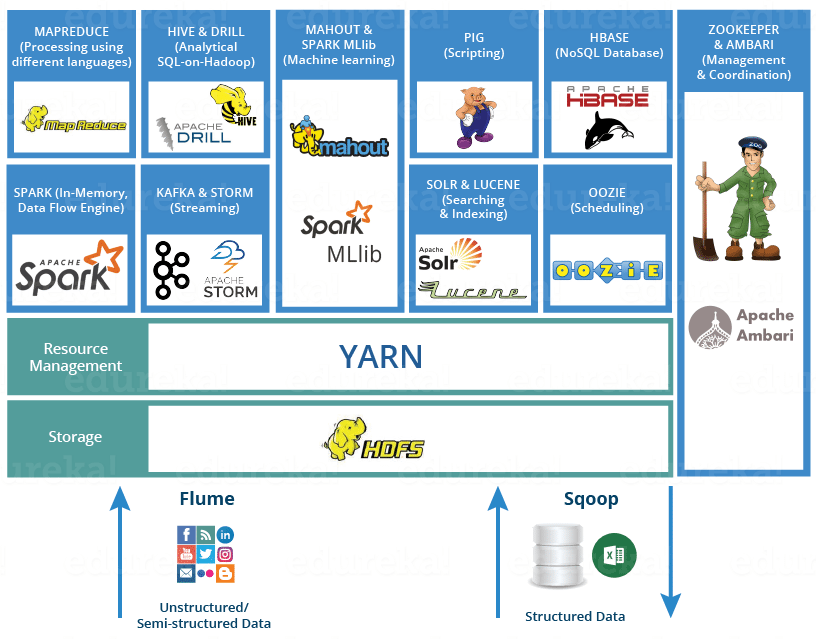 > **说明**:可以通过来了解Hadoop生态圈。
如果要简单的介绍Hive,那么以下两点是其核心:
1. 把HDFS中结构化的数据映射成表。
2. 通过把Hive-SQL进行解析和转换,最终生成一系列基于Hadoop的MapReduce任务/Spark任务,通过执行这些任务完成对数据的处理。也就是说,即便不学习Java、Scala这样的编程语言,一样可以实现对数据的处理。
Hive和传统关系型数据库的对比如下表所示。
| | Hive | RDBMS |
| -------- | ----------------- | ------------ |
| 查询语言 | HQL | SQL |
| 存储数据 | HDFS | 本地文件系统 |
| 执行方式 | MapReduce / Spark | Executor |
| 执行延迟 | 高 | 低 |
| 数据规模 | 大 | 小 |
### 准备工作
1. 搭建如下图所示的大数据平台。

2. 通过Client节点访问大数据平台。

3. 创建文件Hadoop的文件系统。
```Shell
hadoop fs -mkdir /data
hadoop fs -chmod g+w /data
```
4. 将准备好的数据文件拷贝到Hadoop文件系统中。
```Shell
hadoop fs -put /home/ubuntu/data/* /data
```
### 创建/删除数据库
创建。
```SQL
create database if not exists demo;
```
或
```Shell
hive -e "create database demo;"
```
删除。
```SQL
drop database if exists demo;
```
切换。
```SQL
use demo;
```
### 数据类型
Hive的数据类型如下所示。
基本数据类型。
| 数据类型 | 占用空间 | 支持版本 |
| --------- | -------- | -------- |
| tinyint | 1-Byte | |
| smallint | 2-Byte | |
| int | 4-Byte | |
| bigint | 8-Byte | |
| boolean | | |
| float | 4-Byte | |
| double | 8-Byte | |
| string | | |
| binary | | 0.8版本 |
| timestamp | | 0.8版本 |
| decimal | | 0.11版本 |
| char | | 0.13版本 |
| varchar | | 0.12版本 |
| date | | 0.12版本 |
复杂数据类型。
| 数据类型 | 描述 | 例子 |
| -------- | ------------------------ | --------------------------------------------- |
| struct | 和C语言中的结构体类似 | `struct` |
| map | 由键值对构成的元素的集合 | `map` |
| array | 具有相同类型的变量的容器 | `array` |
### 创建和使用表
1. 创建内部表。
```SQL
create table if not exists user_info
(
user_id string,
user_name string,
sex string,
age int,
city string,
firstactivetime string,
level int,
extra1 string,
extra2 map
)
row format delimited fields terminated by '\t'
collection items terminated by ','
map keys terminated by ':'
lines terminated by '\n'
stored as textfile;
```
2. 加载数据。
```SQL
load data local inpath '/home/ubuntu/data/user_info/user_info.txt' overwrite into table user_info;
```
或
```SQL
load data inpath '/data/user_info/user_info.txt' overwrite into table user_info;
```
3. 创建分区表。
```SQL
create table if not exists user_trade
(
user_name string,
piece int,
price double,
pay_amount double,
goods_category string,
pay_time bigint
)
partitioned by (dt string)
row format delimited fields terminated by '\t';
```
4. 设置动态分区。
```SQL
set hive.exec.dynamic.partition=true;
set hive.exec.dynamic.partition.mode=nonstrict;
set hive.exec.max.dynamic.partitions=10000;
set hive.exec.max.dynamic.partitions.pernode=10000;
```
5. 拷贝数据(Shell命令)。
```Shell
hdfs dfs -put /home/ubuntu/data/user_trade/* /user/hive/warehouse/demo.db/user_trade
```
6. 修复分区表。
```SQL
msck repair table user_trade;
```
### 查询
#### 基本语法
```SQL
select user_name from user_info where city='beijing' and sex='female' limit 10;
select user_name, piece, pay_amount from user_trade where dt='2019-03-24' and goods_category='food';
```
#### group by
```SQL
-- 查询2019年1月到4月,每个品类有多少人购买,累计金额是多少
select goods_category, count(distinct user_name) as user_num, sum(pay_amount) as total from user_trade where dt between '2019-01-01' and '2019-04-30' group by goods_category;
```
```SQL
-- 查询2019年4月支付金额超过5万元的用户
select user_name, sum(pay_amount) as total from user_trade where dt between '2019-04-01' and '2019-04-30' group by user_name having sum(pay_amount) > 50000;
```
#### order by
```SQL
-- 查询2019年4月支付金额最多的用户前5名
select user_name, sum(pay_amount) as total from user_trade where dt between '2019-04-01' and '2019-04-30' group by user_name order by total desc limit 5;
```
#### 常用函数
1. `from_unixtime`:将时间戳转换成日期
2. `unix_timestamp`:将日期转换成时间戳
3. `datediff`:计算两个日期的时间差
4. `if`:根据条件返回不同的值
5. `substr`:字符串取子串
6. `get_json_object`:从JSON字符串中取出指定的`key`对应的`value`,如:`get_json_object(info, '$.first_name')`。
> **说明**:可以通过来了解Hadoop生态圈。
如果要简单的介绍Hive,那么以下两点是其核心:
1. 把HDFS中结构化的数据映射成表。
2. 通过把Hive-SQL进行解析和转换,最终生成一系列基于Hadoop的MapReduce任务/Spark任务,通过执行这些任务完成对数据的处理。也就是说,即便不学习Java、Scala这样的编程语言,一样可以实现对数据的处理。
Hive和传统关系型数据库的对比如下表所示。
| | Hive | RDBMS |
| -------- | ----------------- | ------------ |
| 查询语言 | HQL | SQL |
| 存储数据 | HDFS | 本地文件系统 |
| 执行方式 | MapReduce / Spark | Executor |
| 执行延迟 | 高 | 低 |
| 数据规模 | 大 | 小 |
### 准备工作
1. 搭建如下图所示的大数据平台。

2. 通过Client节点访问大数据平台。

3. 创建文件Hadoop的文件系统。
```Shell
hadoop fs -mkdir /data
hadoop fs -chmod g+w /data
```
4. 将准备好的数据文件拷贝到Hadoop文件系统中。
```Shell
hadoop fs -put /home/ubuntu/data/* /data
```
### 创建/删除数据库
创建。
```SQL
create database if not exists demo;
```
或
```Shell
hive -e "create database demo;"
```
删除。
```SQL
drop database if exists demo;
```
切换。
```SQL
use demo;
```
### 数据类型
Hive的数据类型如下所示。
基本数据类型。
| 数据类型 | 占用空间 | 支持版本 |
| --------- | -------- | -------- |
| tinyint | 1-Byte | |
| smallint | 2-Byte | |
| int | 4-Byte | |
| bigint | 8-Byte | |
| boolean | | |
| float | 4-Byte | |
| double | 8-Byte | |
| string | | |
| binary | | 0.8版本 |
| timestamp | | 0.8版本 |
| decimal | | 0.11版本 |
| char | | 0.13版本 |
| varchar | | 0.12版本 |
| date | | 0.12版本 |
复杂数据类型。
| 数据类型 | 描述 | 例子 |
| -------- | ------------------------ | --------------------------------------------- |
| struct | 和C语言中的结构体类似 | `struct` |
| map | 由键值对构成的元素的集合 | `map` |
| array | 具有相同类型的变量的容器 | `array` |
### 创建和使用表
1. 创建内部表。
```SQL
create table if not exists user_info
(
user_id string,
user_name string,
sex string,
age int,
city string,
firstactivetime string,
level int,
extra1 string,
extra2 map
)
row format delimited fields terminated by '\t'
collection items terminated by ','
map keys terminated by ':'
lines terminated by '\n'
stored as textfile;
```
2. 加载数据。
```SQL
load data local inpath '/home/ubuntu/data/user_info/user_info.txt' overwrite into table user_info;
```
或
```SQL
load data inpath '/data/user_info/user_info.txt' overwrite into table user_info;
```
3. 创建分区表。
```SQL
create table if not exists user_trade
(
user_name string,
piece int,
price double,
pay_amount double,
goods_category string,
pay_time bigint
)
partitioned by (dt string)
row format delimited fields terminated by '\t';
```
4. 设置动态分区。
```SQL
set hive.exec.dynamic.partition=true;
set hive.exec.dynamic.partition.mode=nonstrict;
set hive.exec.max.dynamic.partitions=10000;
set hive.exec.max.dynamic.partitions.pernode=10000;
```
5. 拷贝数据(Shell命令)。
```Shell
hdfs dfs -put /home/ubuntu/data/user_trade/* /user/hive/warehouse/demo.db/user_trade
```
6. 修复分区表。
```SQL
msck repair table user_trade;
```
### 查询
#### 基本语法
```SQL
select user_name from user_info where city='beijing' and sex='female' limit 10;
select user_name, piece, pay_amount from user_trade where dt='2019-03-24' and goods_category='food';
```
#### group by
```SQL
-- 查询2019年1月到4月,每个品类有多少人购买,累计金额是多少
select goods_category, count(distinct user_name) as user_num, sum(pay_amount) as total from user_trade where dt between '2019-01-01' and '2019-04-30' group by goods_category;
```
```SQL
-- 查询2019年4月支付金额超过5万元的用户
select user_name, sum(pay_amount) as total from user_trade where dt between '2019-04-01' and '2019-04-30' group by user_name having sum(pay_amount) > 50000;
```
#### order by
```SQL
-- 查询2019年4月支付金额最多的用户前5名
select user_name, sum(pay_amount) as total from user_trade where dt between '2019-04-01' and '2019-04-30' group by user_name order by total desc limit 5;
```
#### 常用函数
1. `from_unixtime`:将时间戳转换成日期
2. `unix_timestamp`:将日期转换成时间戳
3. `datediff`:计算两个日期的时间差
4. `if`:根据条件返回不同的值
5. `substr`:字符串取子串
6. `get_json_object`:从JSON字符串中取出指定的`key`对应的`value`,如:`get_json_object(info, '$.first_name')`。